How to Remove Photo Backgrounds Without Accidentally Leaking EXIF & Location Data
A creator privacy guide to removing photo backgrounds without uploading hidden EXIF metadata like GPS location, phone model, and capture time.
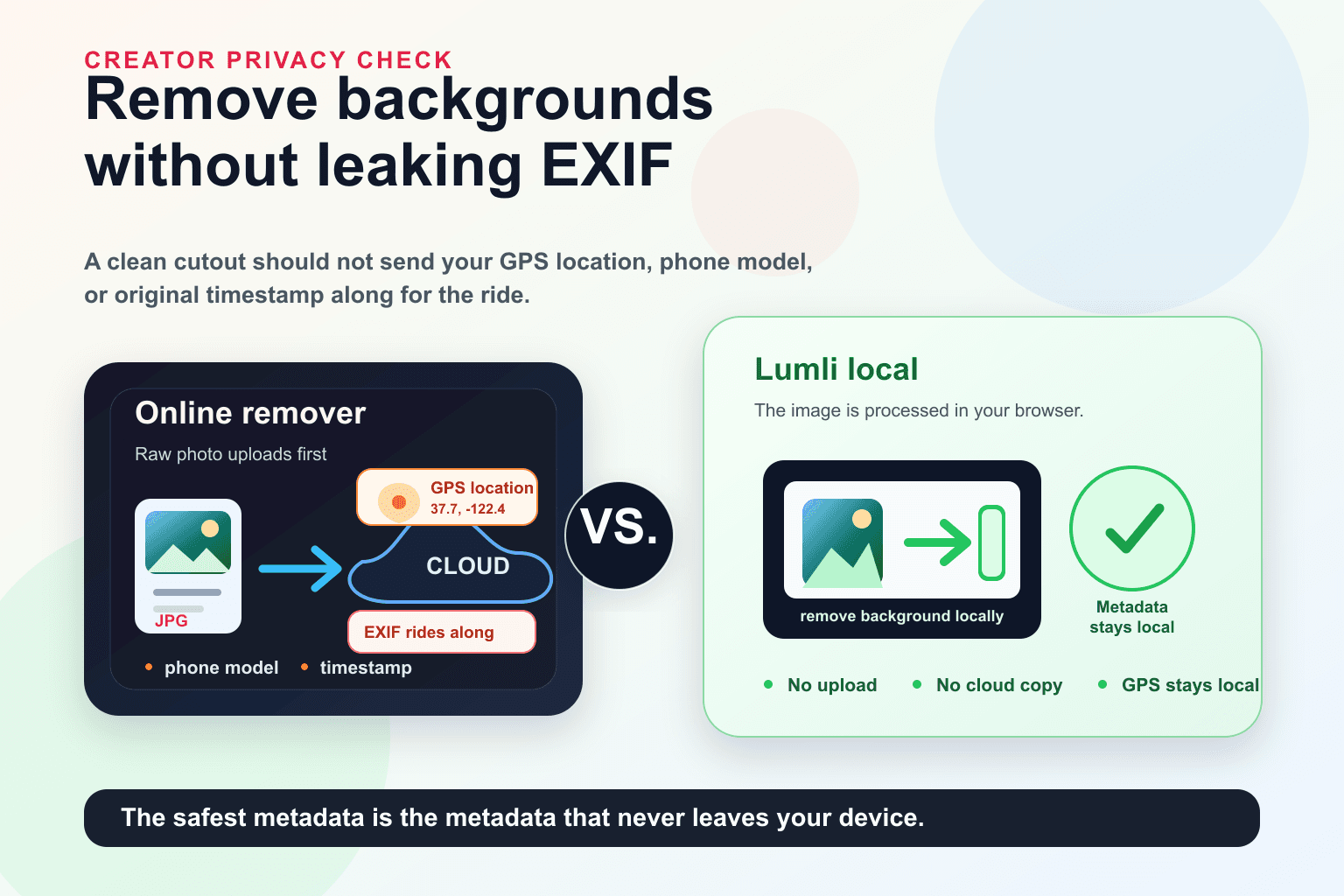
A background remover sounds harmless. You have a portrait, product shot, event photo, or creator image. You want a clean cutout. You upload the image, wait a few seconds, and download the result.
The problem is that the visible background is not the only thing your photo may contain.
A photo can carry a second, invisible photo album: where it was taken, when it was taken, and what device took it.
That invisible information is usually called EXIF metadata. For creators, photographers, influencers, founders, and anyone posting from private spaces, it is worth understanding before handing original images to online tools.
What EXIF data can reveal
EXIF is metadata that can be embedded inside image files. It is often useful for photographers because it can store camera settings, lens information, timestamps, orientation, and editing history.
It can also include details you may not want traveling with the image.
- GPS coordinates if location tagging was enabled on the camera or phone.
- The phone or camera model used to take the photo.
- The original capture date and time.
- Software or editing app information.
- Image dimensions, orientation, and technical camera settings.
Not every photo contains all of this. Many platforms strip metadata from public posts. Some cameras do not store GPS. Some apps remove it during export. But the privacy question starts before the final public post.
The risky step is the upload
When you use a typical online background remover, the original image usually has to leave your device first. That means the server receives the file before it can remove the background, resize the image, or strip metadata from the output.
This is the part that gets missed. A service can say that downloaded results do not include EXIF data, and that may be true. But if the original file was uploaded first, the sensitive metadata already traveled to someone else’s infrastructure.
For a normal product image, that might not matter much. For a creator photo taken at home, a hotel, a studio, a school, a private event, or a client location, it can matter a lot.
Why creators should care
Creators are asked to move fast. Post the campaign. Send the headshot. Clean the background. Make the thumbnail. Upload the press image. Approve the brand asset.
That speed is exactly why small privacy leaks happen. The file looks like a simple photo, so it gets treated like a simple photo. But the original may include location or device metadata that was never meant to become part of an online editing workflow.
- An influencer editing a photo taken at home may expose a private location.
- A photographer sending client previews may upload original capture metadata.
- A public figure cleaning a press image may reveal timing or device details.
- A designer working with unreleased campaign assets may send more than the pixels.
A simple anti-spy checklist
You do not need to become paranoid. You just need a better default workflow.
- Turn off camera location tagging if you do not need GPS in future photos.
- Avoid uploading original files with metadata to random online editors.
- Use local tools when the photo is personal, private, client-related, or location-sensitive.
- Export a clean copy before publishing if you are unsure what metadata remains.
- Treat home, hotel, studio, school, and event photos as location-sensitive by default.
Why local background removal changes the risk
A local background remover changes the architecture. Instead of uploading the original image to a remote server first, the tool processes the photo in your browser on your device.
That matters because the original image and its metadata do not need to be sent to Lumli’s servers for the background removal step. The file can be selected, processed, previewed, and downloaded locally.
This does not mean every image on earth is magically risk-free. Your browser, extensions, operating system, and the way you share the final file still matter. But it removes the cloud upload step from the background-removal workflow, which is the step creators should be questioning first.
The safest metadata is the metadata that stays home
If the photo is public, generic, and already stripped, using a cloud tool may be fine. But if the image is tied to your real location, a client, an unreleased campaign, or a private space, sending the original to a server just to erase the background is an unnecessary tradeoff.
Lumli is built for that better default: clean cutouts in the browser, without making the original file take a cloud detour first.
Remove the background. Keep the metadata where it belongs: on your device.
Want clean cutouts without sending the original photo away?
Try Lumli Remove BG to remove backgrounds locally in your browser, so the original image and its metadata do not need to be uploaded to a remote editor.
Try Lumli Remove BGKeep reading
Related articles
What Happens on Your Device, Stays on Your Device: Bringing Apple's Privacy Standard to Web Tools
Apple made on-device privacy a mainstream expectation. Lumli brings that same local-first idea to browser-based photo and PDF tools.
Read articleCloud AI vs. Local AI Photo Editors: Which One Protects Your Privacy?
A simple technical comparison of cloud AI editors and local AI photo tools, and what each model means for your private images.
Read articleAre Online Image Editors Using Your Private Photos to Train Their Next AI Models?
A creator privacy guide to the fine print behind online image editors, AI training, uploaded photos, and why local editing avoids the trust problem.
Read article