Cloud AI vs. Local AI Photo Editors: Which One Protects Your Privacy?
A simple technical comparison of cloud AI editors and local AI photo tools, and what each model means for your private images.
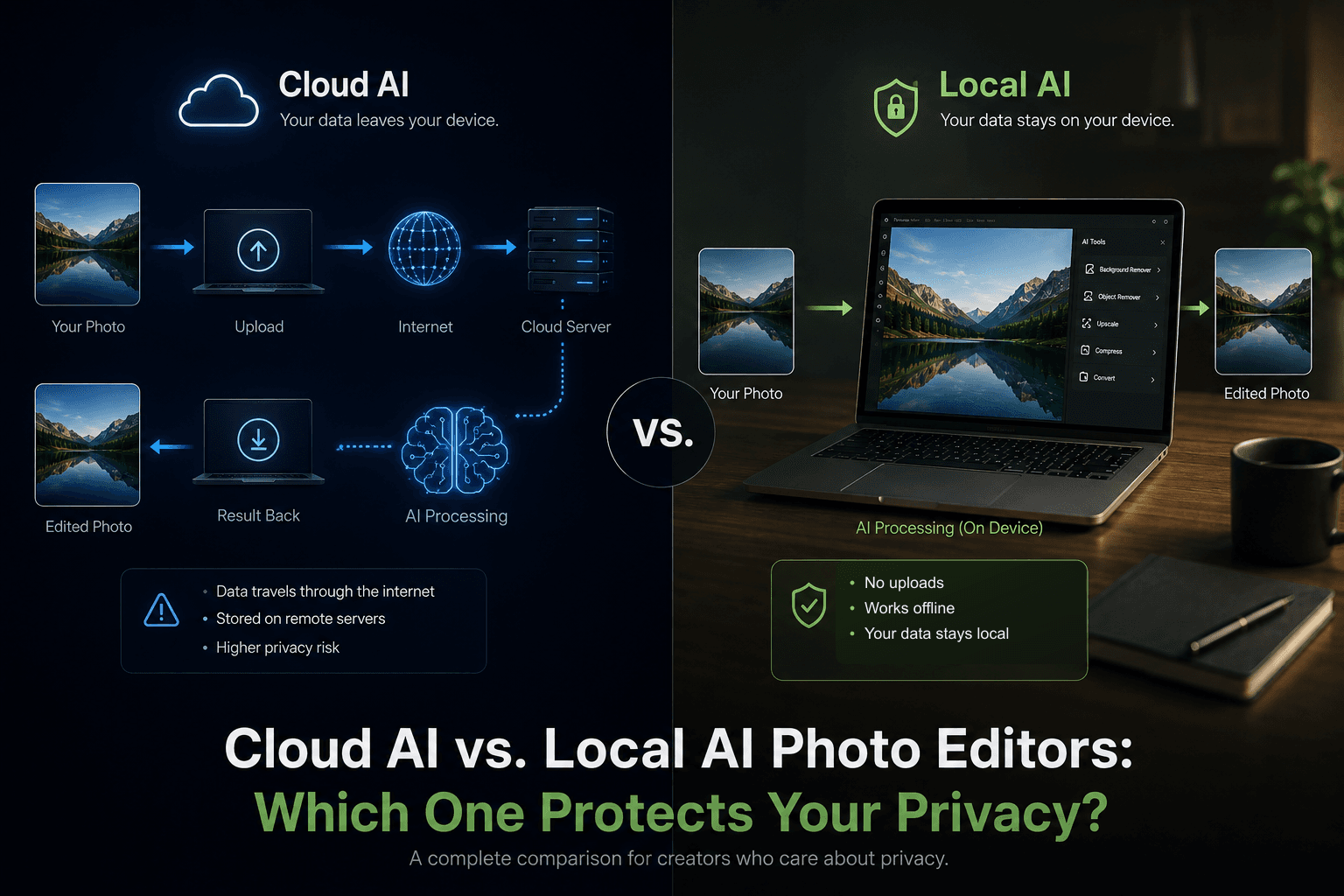
AI photo editors can feel similar from the outside. You upload an image, click a button, wait a few seconds, and get a cleaner result.
But the privacy difference is not in the button. It is in the architecture.
The privacy question is simple: does your photo have to leave your device?
Cloud AI editors and local AI editors can both be useful. They just make a very different tradeoff about where your image is processed and who has to be trusted with the original file.
Cloud AI editors are built around upload
Tools like Canva are powerful because they run as cloud services. That makes collaboration, templates, brand kits, storage, sharing, and cross-device access feel seamless.
The tradeoff is that cloud workflows usually require your file to be sent to a server before AI processing can happen. Public privacy policies for cloud tools often describe receiving uploaded content, account content, media, usage data, and prompts so the service can operate and improve its features.
Read Canva’s public Privacy Policy
That does not automatically mean a cloud tool is unsafe. It means the privacy model depends on the provider, its policies, its infrastructure, its third-party processors, its account settings, and your organization’s rules.
Local AI editors reduce exposure
A local AI photo editor works differently. Instead of uploading the original image to a remote service, the browser downloads the code or model needed for the task, then processes the image on your device.
For a privacy-first workflow, that difference matters. Your photo can be selected, edited, previewed, and exported without becoming part of a cloud upload pipeline.
- The original image stays on your device during the edit.
- The workflow does not require a cloud account or remote project storage.
- The result can be downloaded directly after processing.
- Sensitive photos, client images, drafts, IDs, and private screenshots have less exposure.
The practical difference
Imagine removing an object from a personal photo, cleaning up a product image, or preparing a client screenshot. In a cloud editor, the usual path is upload, process on a server, store or render the result, then download.
In a local editor, the path is shorter: open the tool, choose the image, process in the browser, download the result. There is less infrastructure between you and the edit.
When cloud tools still make sense
Cloud editors are often the better choice for team design systems, shared brand assets, large template libraries, comments, approvals, and projects that need to move across devices.
If the image is already meant to be shared publicly or stored in a team workspace, the convenience of a cloud platform can be worth the tradeoff.
When local tools are the safer default
Local processing is the better default when the image is private, unfinished, confidential, or simply none of anyone else’s business.
That includes personal photos, client work, internal screenshots, legal or financial documents captured as images, product photos before launch, and anything you would hesitate to upload to a random web service.
Why Lumli is local-first
Lumli is built around the idea that everyday image work should not automatically become cloud work. Removing objects, erasing backgrounds, compressing, resizing, converting, and extracting colors can all happen in the browser.
That does not make every local tool perfect for every job. It simply gives you a stronger default when privacy matters: fewer uploads, fewer accounts, fewer copies, and fewer systems touching the original image.
Cloud AI needs trust. Local AI reduces exposure. The right choice depends on the file in front of you.
Want AI editing without the cloud upload step?
Try Lumli Retouch and other browser-native tools to edit images locally without sending the file to a remote editor.
Try Lumli AI ToolsKeep reading
Related articles
Are Online Image Editors Using Your Private Photos to Train Their Next AI Models?
A creator privacy guide to the fine print behind online image editors, AI training, uploaded photos, and why local editing avoids the trust problem.
Read articleWhat Happens on Your Device, Stays on Your Device: Bringing Apple's Privacy Standard to Web Tools
Apple made on-device privacy a mainstream expectation. Lumli brings that same local-first idea to browser-based photo and PDF tools.
Read articleHow to Remove Photo Backgrounds Without Accidentally Leaking EXIF & Location Data
A creator privacy guide to removing photo backgrounds without uploading hidden EXIF metadata like GPS location, phone model, and capture time.
Read article